
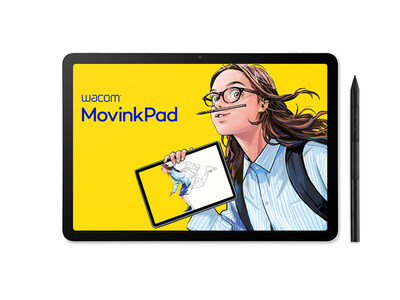
The nicest thing about Wacom’s MovinkPad 11 is that it does not ask a beginner to build a digital-art workstation before making the first bad sketch.
That sounds small until you remember how digital drawing usually starts. Buy a tablet. Pair a pen. Install drivers. Decide whether the screenless tablet feels weird. Buy software. Figure out why the cursor is not quite where your hand expects it to be. For a teenager, student, hobbyist or lapsed sketchbook person, that friction can kill the urge before the first layer.
Wacom’s pitch is simpler: pick up the MovinkPad 11, tap the included Pro Pen 3 on the screen, and start drawing in Wacom Canvas. TechCrunch’s August 7 hands-on piece lands in roughly the same place, calling it an approachable midpriced entry point rather than a pro workstation. That distinction is the whole appeal.
GearPulse’s view: this matters because creative gadgets live or die in the first five minutes. A camera, synth, tablet or sketching device can have brilliant specs and still fail if it makes the user feel clumsy. The MovinkPad 11 is relevant because it tries to make drawing feel immediate again.
It also connects to our recent piece on indie apps beating AI bloat. The theme is similar: good tools often win by removing hesitation, not by shouting the biggest number on the box.
What Wacom is selling
The MovinkPad 11 is a standalone Android drawing tablet, not a traditional pen display that needs a PC.
| Item | Wacom MovinkPad 11 |
|---|---|
| Display | 11.45-inch IPS touch display |
| Resolution | 2200 x 1440 on Wacom’s support/community pages; Wacom’s eStore comparison table currently lists 2560 x 1600 |
| Refresh rate | 60Hz / 90Hz modes |
| Color | 99% sRGB, according to Wacom |
| Processor | MediaTek Helio G99 |
| Memory / storage | 8GB RAM, 128GB storage |
| OS | Android 14 with Google Mobile Services |
| Pen | Wacom Pro Pen 3, battery-free, 8,192 pressure levels |
| Battery | 7,700mAh typical |
| U.S. launch price context | $449 at launch; TechCrunch frames current street context around $500 |
| Europe eStore context | 459.99 euros on Wacom’s German eStore at publication time |
The resolution mismatch is worth calling out because Wacom’s own pages do not all say the same thing. The support page and Wacom community article list 2200 x 1440, while the current European eStore comparison table says 2560 x 1600. Until Wacom cleans that up globally, treat the support page as the safer spec and check your local SKU before buying.
The beginner-friendly part is the workflow
The obvious comparison is an iPad plus Apple Pencil. That is fair, but incomplete. An iPad is the better general tablet and the bigger app ecosystem. The MovinkPad 11 is more focused. It includes the pen, has a textured anti-glare glass surface, runs Wacom Canvas, includes a two-year Clip Studio Paint DEBUT license, and supports other EMR pens from brands Wacom names, including LAMY and STAEDTLER.
That makes it less flexible as a tablet but more direct as a drawing object.
| Buyer question | Why the MovinkPad answer is interesting |
|---|---|
| Do I need a computer? | No. It runs Android 14 on its own. |
| Do I need to buy a pen separately? | No. Wacom includes the Pro Pen 3. |
| Can it wake straight into sketching? | Yes. Wacom’s Quick Draw path launches Wacom Canvas from sleep. |
| Can I use it as a normal Android tablet? | Mostly yes, with Google Play access, cameras, speakers and Bluetooth. |
| Can I use it as an external pen display? | Wacom’s community FAQ says no for the original MovinkPad 11, while newer Wacom Lab features and Pro models complicate the broader lineup. Check your exact model. |
That last caveat matters. If your dream is to draw directly into desktop Photoshop, Clip Studio or Blender on a Mac or Windows machine, do not assume this behaves like a Cintiq. The original sales pitch is standalone sketching first.
Why it feels more personal than another tablet launch
There is a sweet, almost analog reason this product keeps sticking in my head. It is for people who still think in sketches.
Not every creator wants a full laptop and not every student wants to commit to a professional setup. Sometimes the idea is a character pose, a storyboard panel, a car shape, a UI doodle, a silly comic, a color study, or just a way to disappear into drawing for an hour. A focused tablet with a pen in the box respects that impulse better than a general-purpose slab that happens to support a stylus.
The risk is that Wacom has to keep the device from feeling frozen. Android 14 is already the listed operating system, and Wacom’s community FAQ says the OS cannot be upgraded. That may be acceptable for a drawing appliance, but it is a real caveat if you think of this as a long-term Android tablet.
Who should care
| User | Fit |
|---|---|
| Beginner digital artist | Strong fit if you want a ready-to-draw setup without a PC. |
| Student who sketches between classes | Strong fit: portable, pen included, no driver setup. |
| Casual tablet buyer | Weak fit unless drawing is the reason you are buying. |
| Professional illustrator | Useful as a portable sketchpad, not necessarily as the main production machine. |
| iPad owner with Apple Pencil | Only tempting if you specifically want Wacom’s pen feel and a drawing-first device. |
I would not buy it as a cheaper iPad. I would buy it because you want a digital sketchbook that treats drawing as the default behavior.
Bottom line
The MovinkPad 11 is interesting because it lowers the emotional cost of starting digital art.
It is not the fastest tablet, not the most future-proof Android device, and not a replacement for a full desktop pen-display setup. But as a self-contained creative pad with a real Wacom pen, textured glass, included starter software and a price that sits below many pro setups, it has a clear job.
For the right person, that job is enough: stop preparing to draw and just start drawing.
Support independent GearPulse articles at buymeacoffee.com/gearpulse.site.