
Windows 11 version 26H1 sounds like the next normal Windows release. It is not.
Microsoft says 26H1 was released on February 10, 2026, but the company is also very clear about what that means: this is a specialized Windows 11 build for select new devices, starting with PCs built around Qualcomm’s Snapdragon X2 Series processors. It is not the big annual feature update that existing Windows 11 users will receive through Windows Update.
That distinction matters because the name is confusing. A version number ending in H1 usually looks like a mainstream half-year release. In practice, 26H1 is closer to a platform branch for new silicon. If your current laptop is on Windows 11 24H2 or 25H2, Microsoft is not preparing to offer 26H1 as an in-place update. The more ordinary Windows feature update path remains separate.
The quick version
| Question | Current answer |
|---|---|
| Is Windows 11 26H1 released? | Yes. Microsoft lists February 10, 2026 as the release date. |
| Will existing Windows 11 PCs get it through Windows Update? | No. Microsoft says it is not offered as an in-place feature update. |
| Who gets it? | Select new PCs built for next-generation silicon, beginning with Snapdragon X2 devices. |
| Is it a huge user-facing feature release? | Not really. The point is platform support, performance, efficiency, and silicon enablement. |
| Should normal users wait for it? | No. Most people should watch the broader 2026 Windows feature work instead. |
The short read: 26H1 is important, but probably not for the reason the version number suggests.
Why Microsoft made a special 26H1 release
The official explanation is silicon.
Microsoft’s IT documentation describes 26H1 as a specialized release built with device manufacturers and silicon partners for the next generation of hardware. Its support page says it brings silicon advances for better performance and battery life. Windows Central reports that the release is tied to the newer Windows platform branch known as Bromine, which is needed for Snapdragon X2 devices and expected next-generation hardware such as NVIDIA’s N1X platform.
That is the practical reason 26H1 exists: new chips sometimes need a newer Windows core before the rest of the ecosystem is ready to move.
We saw a version of this before. Snapdragon X PCs arrived with Windows 11 24H2 before that update became a broad release for existing systems. Microsoft appears to be repeating the playbook, but this time it is being more explicit that 26H1 is not meant for the whole installed base.
The catch: 26H1 is a side road
The unusual part is servicing.
Microsoft says 26H1 devices will receive monthly security and preview updates, but they will not be able to move to the next annual Windows feature update in the second half of 2026. Microsoft says that is because 26H1 uses a different Windows core from 24H2, 25H2, and the upcoming mainstream feature update.
That sounds awkward, but it may be less dramatic than it reads. These machines are still supported, and Microsoft says they will have a path to a future Windows release. The point is that 26H1 is not a stepping stone to 26H2. It is its own platform lane.
For IT admins, this is the part to pay attention to. A 26H1 laptop is not just “a newer Windows 11 laptop.” It is a device that may sit outside the normal 2026 feature update flow. That can affect deployment rings, imaging, support documentation, app validation, driver testing, and purchasing decisions.
What it brings to users
The honest answer is: less than the name implies.
Microsoft has not framed 26H1 as a giant consumer feature release. The point is to make new hardware work properly and efficiently. If you buy one of the supported new devices, the benefit should be felt in the boring places: battery life, platform stability, driver support, sleep and wake behavior, performance scheduling, and hardware-specific features.
That is useful. It is just not the same thing as a new Start menu, a big Copilot redesign, or a new File Explorer. Many visible Windows improvements arriving through Insider builds are not exclusive to 26H1 and may land elsewhere when ready.
The right way to think about 26H1 is as a hardware enabler. It is the floor under the house, not the furniture.
The user-feedback story is separate, but real
The more interesting Windows story in 2026 is not 26H1 itself. It is that Microsoft appears to be repairing some of Windows 11’s most obvious trust problems.
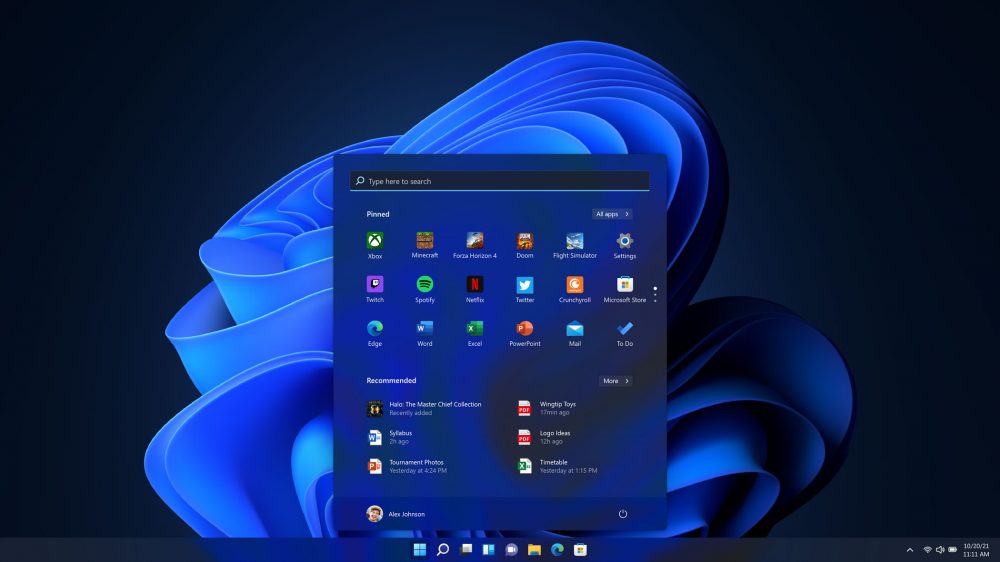
The Start menu is the clearest example. Windows 11 has spent years annoying users who want less clutter, fewer recommendations, more direct access to apps, and more control over layout. Microsoft’s May Insider work finally addresses several of those complaints:
- Section-level toggles for Pinned, Recommended, and All apps.
- A separate control for file recommendations so Start can be cleaned up without breaking recent files elsewhere.
- Small and large Start menu sizes.
- The option to hide the account name and profile picture for privacy while screen sharing.
- A rename from Recommended to Recent, which better matches what the section is supposed to show.
Taskbar changes are in the same category. Microsoft is testing alternate taskbar positions and a smaller taskbar, both of which sound mundane until you remember how many Windows 10 users lost familiar layout options when Windows 11 arrived.
This is Microsoft listening, but slowly.
Updates are getting less hostile
Windows Update is another place where Microsoft is finally using plain product sense.
In April, the Windows team said it was separating normal power actions from update actions. That means Restart and Shut down can remain just Restart and Shut down, while Update and restart and Update and shut down stay available when needed. Microsoft also said it is coordinating driver, .NET, firmware, and quality updates to reduce the number of monthly restarts.
This is exactly the kind of change users notice because it removes a small betrayal from the operating system. When someone clicks Shut down before leaving a desk, Windows should not reinterpret that as permission to install a pending update. Giving users explicit choices is not glamorous, but it is how you rebuild confidence.
Microsoft has also been talking more openly about reliability: fewer crashes, better driver quality, faster File Explorer, more predictable update recovery, better Windows Hello, less noisy setup, and clearer controls around AI and widgets. That language is not accidental. Windows 11’s problem has not been only features. It has been trust.
Did Microsoft listen?
Partly, yes.
The company has clearly heard years of complaints about Start, Taskbar, update restarts, distractions, and forced-feeling defaults. The 2026 Insider work reads like a response to those pressure points. The changes are practical, sometimes overdue, and mostly aimed at giving users more control.
But Microsoft has not fully reversed course. The new Start menu controls still appear to be defined choices rather than total freedom. The taskbar work still has limitations around auto-hide, touch gestures, search boxes, and per-monitor behavior. And because many of these features are still in Insider channels, they should be treated as moving targets rather than promises for every PC tomorrow.
The fairest assessment is this: Microsoft is listening more than it did during Windows 11’s early years, but it is still listening through the filter of its own design system, telemetry, and rollout machinery.
Should you care about 26H1?
Care if you are buying or managing next-generation Windows on Arm hardware.
If Snapdragon X2 laptops deliver meaningful battery, performance, compatibility, and thermal improvements, 26H1 will be part of that story. It may also matter for developers validating apps on the newest Windows platform branch.
Do not care if you are waiting for the next big Windows feature update on your current machine. For most users, the important 2026 Windows improvements are happening through the broader Insider and annual update track, not through 26H1 specifically.
Bottom line
Windows 11 26H1 is real, but it is not the Windows update most people think it is. It is a targeted platform release for new silicon, not a broad feature update for the existing Windows 11 base.
The better story is that Microsoft seems to be doing the unglamorous work users have been asking for: more Start menu control, a more flexible taskbar, less disruptive updates, better reliability, and a quieter operating system.
That is not a revolution. It is Windows remembering that the best feature is often the one that stops getting in your way.
Support independent tech coverage at buymeacoffee.com/gearpulse.site.