
Software updates are normally sold as a list of features. Samsung’s stable One UI 9 rollout is a useful reminder that availability is the feature that decides whether the list matters at all.
Samsung says the rollout began September 16 with the Galaxy S26, S26+ and S26 Ultra, after One UI 9 debuted on the Galaxy Z Fold8 Ultra, Fold8 and Flip8. That is a real starting line, not a promise that every eligible Galaxy will have it by breakfast. The company says other devices will receive it gradually; 9to5Google, SamMobile and Android Authority independently report the same initial S26-family scope and a market-by-market expansion.
That distinction deserves more attention than another AI headline. A phone’s software support is worth something only when the owner can reasonably expect the update, understand what it changes and decide which new permissions or services to use. One UI 9 has several practical improvements. It also comes with the familiar update caveat: model, region, language, carrier and account status can all shape the experience.
The rollout is concrete, but its edges are still soft
Samsung’s announcement confirms the first three non-folding phones in line. It does not publish a universal date-by-date calendar for every Galaxy model and country. That makes the advice unusually straightforward: use the phone’s own Settings update screen, check Samsung’s local newsroom or support page, and do not treat a list of compatible devices as a delivery schedule.
| What is confirmed | What is not promised globally | Why it matters |
|---|---|---|
| Stable One UI 9 began rolling out on September 16 for Galaxy S26, S26+ and S26 Ultra. | One day when every supported Galaxy receives it. | Carrier testing and regional release sequencing can leave two identical phones on different versions. |
| Fold8 Ultra, Fold8 and Flip8 already shipped with the release. | Feature parity in every country and language. | AI, translation and safety features have their own availability conditions. |
| Samsung says rollout to additional Galaxy devices will be gradual. | That a device named in a feature footnote is already receiving the full update. | A support list is evidence of intent, not proof that an OTA package is waiting today. |
This is not an argument against buying a Galaxy. It is a reason to separate a product’s stated support policy from its practical update cadence. Anyone choosing an S26 FE for its software-first pitch should read our earlier look at why Samsung’s Galaxy S26 FE makes software timing its sharpest value play. The stable rollout gives that argument more substance, while also showing why a published rollout calendar would be even better.
The best additions are the ones that reduce friction
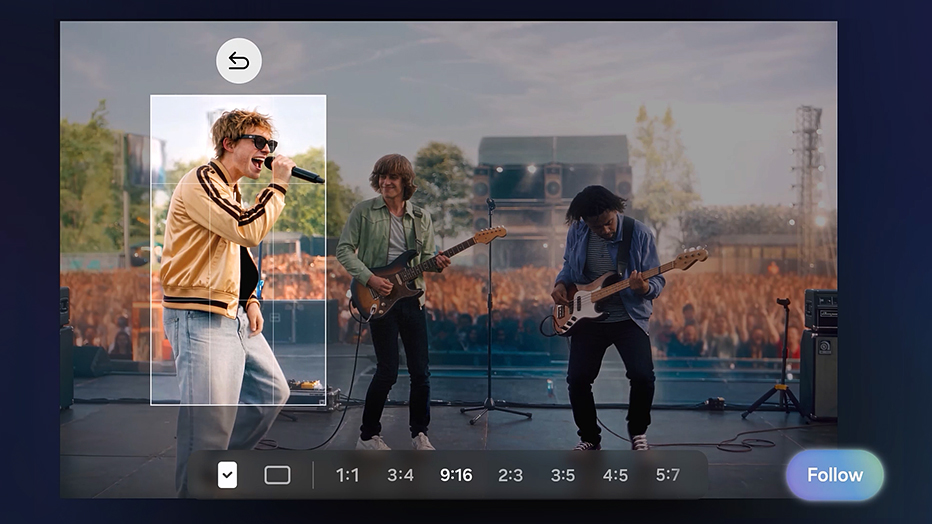
Samsung highlights My FanCam, which automatically follows a selected person in recorded video and reframes the footage. It is a handy idea for a recital or amateur sport, but Samsung notes that it requires a Samsung account, may not find a subject, and does not guarantee accuracy. It is a convenience feature, not a replacement for checking the video before sharing it.
Other changes are more quietly useful. Warranty and Care places coverage, device diagnostics, repair estimates and service booking in Settings, subject to regional availability. Document Scan is designed to better handle curved pages and folded corners. Interpreter gains a threaded view, while Voice Recorder presents summaries in a more structured format. These are the kinds of improvements that can earn a place in a daily routine without asking the user to reorganize it around AI.
| Feature | Sensible use | Caveat worth remembering |
|---|---|---|
| Warranty and Care | Check coverage or start a repair journey without hunting through apps and websites. | Estimates, Care+ terms and service availability vary by market and device. |
| Document Scan | Capture book pages and imperfect paper documents with less manual correction. | Inspect the scan before relying on it for an official record. |
| Interpreter thread view | Follow a continuing translated conversation more easily. | Language availability and quality are not uniform everywhere. |
| My FanCam | Keep a chosen subject centered in casual video. | Subject detection can fail; review framing rather than assuming it worked. |
Privacy tools should prompt a settings check, not blind trust
The more consequential part of the release is Samsung’s Security Brief and Privacy Alerts. Samsung says Privacy Alerts use on-device AI to surface possible issues such as unnecessary background permission access; Security Brief brings malware, unknown-app and permission updates into Now Brief. Those are worthwhile prompts to investigate—not security guarantees.
The useful habit is to open the alert, identify the app, and decide whether its permission makes sense for what it does. A camera editor might need photo access; a flashlight app asking for contacts plainly deserves scrutiny. Samsung also says availability varies by device, region and OS version, and its listed models should not be mistaken for a complete rollout roster.
That restraint matters because One UI 9 adds more contextual software, including Now Nudge and editable Now Brief cards. Personalization is only helpful when people can tell what data feeds it and can turn it off. Before enabling a new feature, check its account requirement, privacy controls and whether it has a genuine place in your routine.
Bottom line
One UI 9 has enough sensible improvements to make it a meaningful Android 17 update for Galaxy owners. But the story is not that every new AI feature is essential. It is that Samsung has started a stable rollout, and the responsible next step is to make availability, compatibility and privacy controls as clear as the feature list.
If you have an S26-series phone, check for the update and read the changelog before installing. If you have another Galaxy, wait for Samsung to name your device and market rather than trusting a speculative calendar. A good update should arrive predictably, explain itself clearly, and leave the owner more in control than before.