
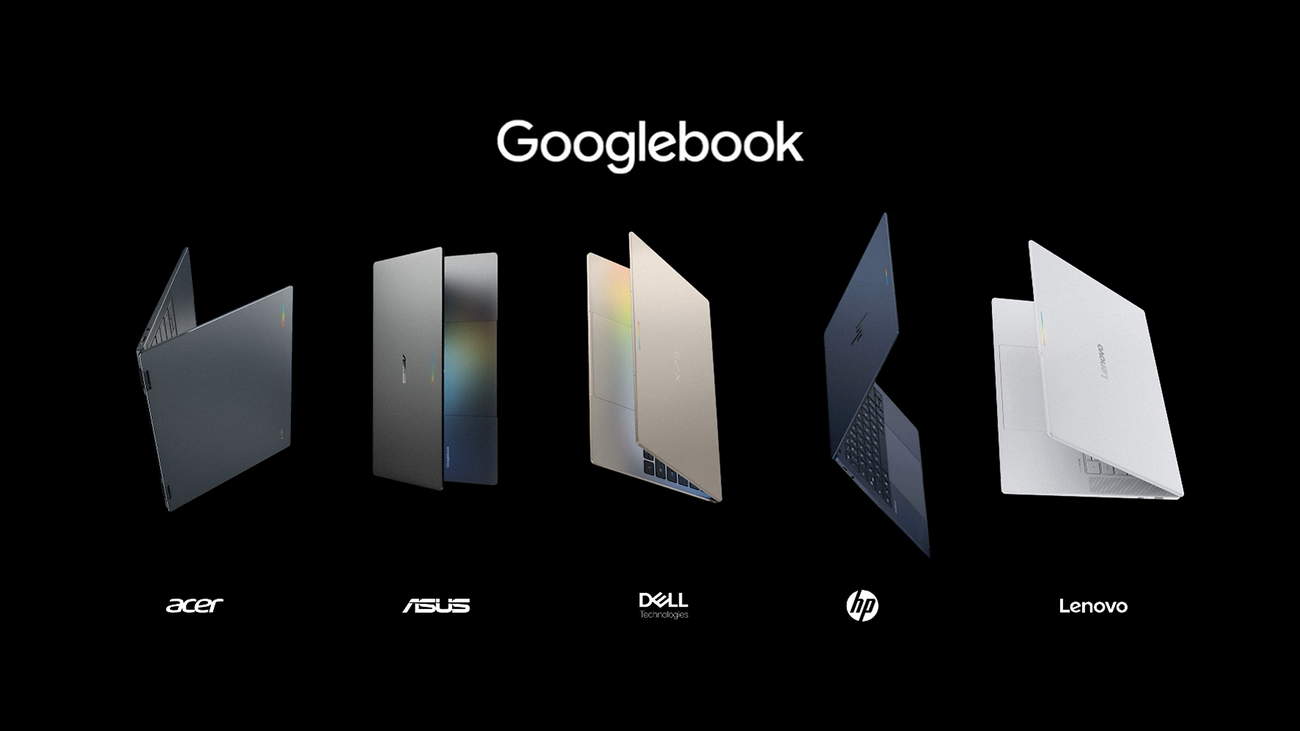
Googlebook is no longer a strategy slide. Google has put five premium laptops on sale from Acer, ASUS, Dell, HP and Lenovo, with U.S. prices starting at $899 and first retail availability set for October 4.
That makes this a more consequential launch than another AI-software update. Googlebook is Google’s attempt to give Android users the kind of phone-to-laptop continuity Apple has spent years turning into a habit: move files without thinking about cables, reach phone apps from the larger screen, and let the two devices behave less like separate computers.
The intriguing part is that Google is not trying to replace every Chromebook. It is aiming at the person who already owns a good Android phone and has started to notice how awkward their laptop feels beside it.
GearPulse’s view: laptops have become remarkably interchangeable at the spec-sheet level. Googlebook’s chance is not Gemini alone; it is whether opening a laptop feels like picking up where your phone left off. That is a practical promise, and a much tougher one to deliver than a flashy AI demo.
The launch, in plain English
Google describes Googlebook as a new flagship category that combines Android’s app stack with desktop foundations from ChromeOS. The first five machines span a convertible through a lightweight travel model and larger workstation-style options. They are not Google-branded hardware; the manufacturers build them under the Googlebook platform.
| Launch fact | What Google says |
|---|---|
| Makers | Acer, ASUS, Dell, HP and Lenovo |
| U.S. starting price | $899 |
| U.S. availability | October 4, 2026 |
| Other first-wave markets | Canada, UK, Ireland, France, Germany and Australia from October 5 |
| Processors | Intel Core Ultra Series 3 or Snapdragon X Elite, depending on model |
| Memory | 16GB minimum; up to 32GB on some models |
| Claimed battery life | Up to 14 hours video playback or 16 hours web browsing |
| Software support | Google promises feature drops and updates for up to 10 years |
Those are portfolio-level claims, not a promise that every Googlebook will match the best number. Battery life, ports, display quality, RAM and chip choice are all model-specific. PCWorld’s hands-on overview is useful context here: there are five noticeably different machines, so buyers should shop the individual hardware rather than treat “Googlebook” as one laptop.
The feature worth watching is not the AI cursor
Googlebook arrives with Gemini features such as Magic Pointer, which lets a user point at on-screen content and ask for help, and Create My Widget, which turns a prompt into a desktop widget. They could be handy. They could also join the long list of AI shortcuts people ignore after the first week.
The more interesting capabilities are quieter:
| Feature | Why it could matter in everyday use | Important caveat |
|---|---|---|
| Cast My Apps | Phone apps can appear on the laptop without a traditional install | Google says setup is required, and the phone must run Android 17 or later. |
| Quick Access | Phone files can be surfaced on the laptop | It only feels magical if permissions and offline behavior are clear. |
| Android apps beside desktop Chrome | A buyer can keep familiar mobile tools while using a desktop browser | App quality on a large display will still vary. |
| Gemini Intelligence | On-screen context can power shortcuts, comparison and creation | Some features require an internet connection, and results can vary. |
That phone-first angle is why the Googlebook launch belongs beside our look at Gemini moving into everyday Chrome tabs. Chrome is becoming a more active workspace; Googlebook is the attempt to make that workspace follow an Android user across devices.
Google has made the sensible hardware choices
Starting at 16GB of memory is a refreshing floor for a laptop line that wants to be taken seriously. So is the choice to offer both Intel Core Ultra Series 3 and Snapdragon X Elite systems. It gives manufacturers room to differentiate around weight, battery life, ports and performance instead of forcing one architecture on everyone.
HP’s own Googlebook 14 announcement, for example, describes an OLED touch display and a 5MP camera. Google says the ASUS model weighs 2.2 pounds, while Acer is the lineup’s convertible. That is a healthier launch shape than a single reference design pretending every kind of buyer has the same priorities.
Google also includes a 12-month Google AI Pro offer with 5TB of storage and other trials in the U.S. package. Treat that as a temporary perk, not the reason to choose a computer. The durable value has to be the device’s software and hardware after those subscriptions expire.
The awkward comparison is not Chromebook
Google is explicit that Googlebook is not a Chromebook replacement. That is sensible: Chromebooks still serve schools, shared-device fleets and buyers who value their low-friction, lower-cost approach.
The real comparison is a premium Windows laptop or a MacBook paired with an Android phone. At $899, Googlebook is no longer asking for a casual second-device purchase. It is asking people to trust a new platform with their work, creative tools and everyday admin.
That raises questions no launch presentation can settle yet:
- How complete are the desktop browser, Android-app and Linux-tool workflows in practice?
- Do phone apps look like useful companions on a laptop, or stretched mobile screens?
- Which Gemini functions are genuinely local, which require the cloud, and which are available in each market?
- Will updates stay useful for a decade, rather than merely arrive for a decade?
Ars Technica’s launch report and Axios’s analysis both land on the same underlying tension: Googlebook has a distinct ecosystem pitch, but that does not make it an automatic Windows or Mac replacement. That is the right level of skepticism before reviews of retail hardware arrive.
Who should keep an eye on it
| Buyer | Early read |
|---|---|
| Android-phone power user | The clearest audience; phone continuity is the product’s strongest differentiator. |
| Chromebook fan | Worth watching if you want more premium hardware, but do not assume the experience is identical. |
| Windows or Mac power user | Wait for deep app, peripheral and developer-workflow testing. |
| Student or general home buyer | Compare the exact model, display, storage and local price against a conventional laptop before deciding. |
| AI-curious shopper | Do not buy solely for Gemini features; software promises need time outside a demo. |
Bottom line
Googlebook has cleared the first hurdle: it looks like a real laptop family, not a compromised mobile experiment. The prices, 16GB baseline, multiple chip options and familiar manufacturer names give Android users a credible reason to pay attention.
But the durable test begins on October 4. Google needs the phone-and-laptop handoff to feel effortless, Android apps to feel at home on a larger screen, and Gemini to help without turning the desktop into a collection of prompts. If it can do that, Googlebook may finally give Android a laptop identity of its own.
Support independent GearPulse articles at buymeacoffee.com/gearpulse.site.