
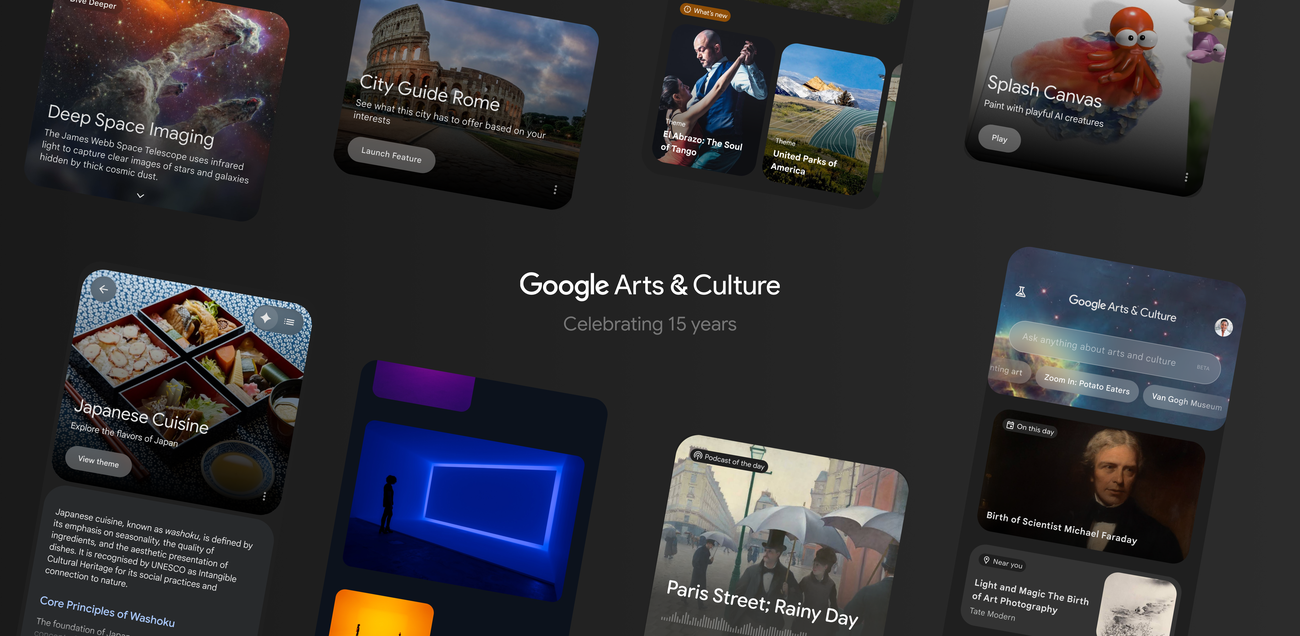
Google Arts & Culture has spent 15 years doing the unglamorous but important work of making museum collections, archaeological objects and local histories easier to find online. Its new mobile-app redesign changes the starting point. Instead of arriving with the name of an artist or institution in hand, visitors can begin with a question, a visual prompt or a city.
That is a meaningful change to the product, not just a fresh coat of paint. Google says the refreshed app pairs conversational search with images and curated material from its cultural partners; it also rolls a new home feed, 27 additional City Guide destinations and two AI experiments into the experience. The Verge and iPhone in Canada independently report the same headline features, while Italian outlet TuttoAndroid had already documented the new Home tab and AI-led search in the app’s rollout.
The central editorial distinction is worth protecting: a question answered with partner-archive material can help someone find their way into culture. A chatbot that performs a historical artist is a creative interface. They may sit next to each other in the app, but they earn trust differently.
The redesign changes the first question
Google says Arts & Culture now works with more than 3,000 cultural institutions and artists in over 90 countries. That scale is impressive but can be intimidating: a giant digital archive is only useful if a visitor can form a path through it.
The new app offers three entry points:
| Start here | What Google says it does | Best use | Caveat | | --- | --- | --- | | Conversational search | Answers natural-language questions with explanations, visuals and curated stories from partner archives | Exploring a topic when you do not know the collection or artist first | “Grounded” is a product claim, not a guarantee that every answer is complete or error-free | | Home feed | Surfaces short stories, daily highlights and direct feature access | Serendipitous browsing | A feed can encourage discovery, but it also decides what gets attention | | City Guide | Adds 27 destinations with cultural landmarks and real-time cultural events | Turning a trip or local afternoon into a cultural route | Event accuracy and local availability can change quickly |
For a person who asks “Where can I see Impressionism in Paris?” or wants a visual explanation of chiaroscuro, question-led search is potentially more humane than forcing them to understand an archive’s taxonomy first. It does not replace an institution’s own collection page, scholarship or curatorial context. It can make the first click much less forbidding.
That is the feature with genuine audience value. Museums and archives have extraordinary material, but they do not always present it around the loose, ordinary questions that lead people into learning. A good answer can connect curiosity to an object, a story and the institution that preserves it.
The two AI experiments should not borrow the same authority
Chrono Look transforms a user’s selfie into historical clothing looks through sketches and more realistic renderings. Google’s own feature page says it is available in the Arts & Culture app. It is a playful visual experiment, and the value is obvious: fashion history becomes something people can place themselves inside rather than merely scroll past.
Dial-an-Artist is a more delicate proposition. Google presents it as a way to have simulated conversations with historical artists about their work. The Verge likewise describes it as an AI chatbot modelled on a historical artist. That qualifier is not fine print. A synthetic exchange may prompt someone to explore a painter’s work; it is not a primary source, an oral history or a recovered artistic voice.
The product should keep those modes unmistakably separate:
| Feature | What it can responsibly offer | What it must not imply |
|---|---|---|
| Archive-led search | A useful route to images, partner stories and further reading | That a fluent answer settles a historical question |
| Chrono Look | An imaginative, visible interpretation of historical dress | That the rendering is documentary reconstruction |
| Dial-an-Artist | A guided, clearly labelled learning prompt | That the artist actually said, endorsed or would recognise the response |
This is not an argument against the experiment. A well-labelled simulation may lower the threshold for engaging with a difficult subject, especially for a younger audience. But cultural software is at its best when it leads users outward—to an artwork, a collection record, an exhibition or a local institution—rather than making the generated conversation feel like the destination.
The practical test is whether it sends people deeper
Google’s 15-year milestone matters because the underlying partner network exists. The company says the app encompasses high-resolution artworks, archaeological 3D artifacts, fashion, performance, craft, food heritage, science and natural history alongside more familiar gallery material. AI can be helpful at that scale if it acts like a map with visible sources rather than a confident tour guide with no trail.
For visitors, the sensible way to use the refresh is simple: use the conversational tool to frame a question, then open the associated institution and inspect the work in context. Treat City Guide as a starting list rather than a complete itinerary. Treat an artist simulation as an invitation to read, not as a quotation.
For Google, the next quality bar is transparency at the moment it matters. Search answers should preserve a clear path back to the partner material. Simulated people should say plainly that they are simulations, not wait for users to infer it. And a global rollout deserves careful local testing: an app that is delightful in one language, city or collection can still be thin in another.
Bottom line
The strongest part of Google Arts & Culture’s redesign is not the novelty of chatting with the past. It is the chance to make a vast, sometimes intimidating cultural archive answer a visitor’s first real question.
If the app consistently points that curiosity back to participating museums, artists and collection records, the new interface could make digital culture feel less like a warehouse and more like a doorway. If the AI layer becomes the main attraction, it risks turning the archive into scenery. The difference will be visible in the links, labels and context the app gives people after the clever first interaction.