
The most exciting software updates are often the least glamorous. They do not arrive with a new logo, a celebrity demo or a claim that creativity has been reinvented. They simply remove one more reason a working person says, “I cannot use this yet.”
That is why GIMP’s August 2026 development update is worth paying attention to.
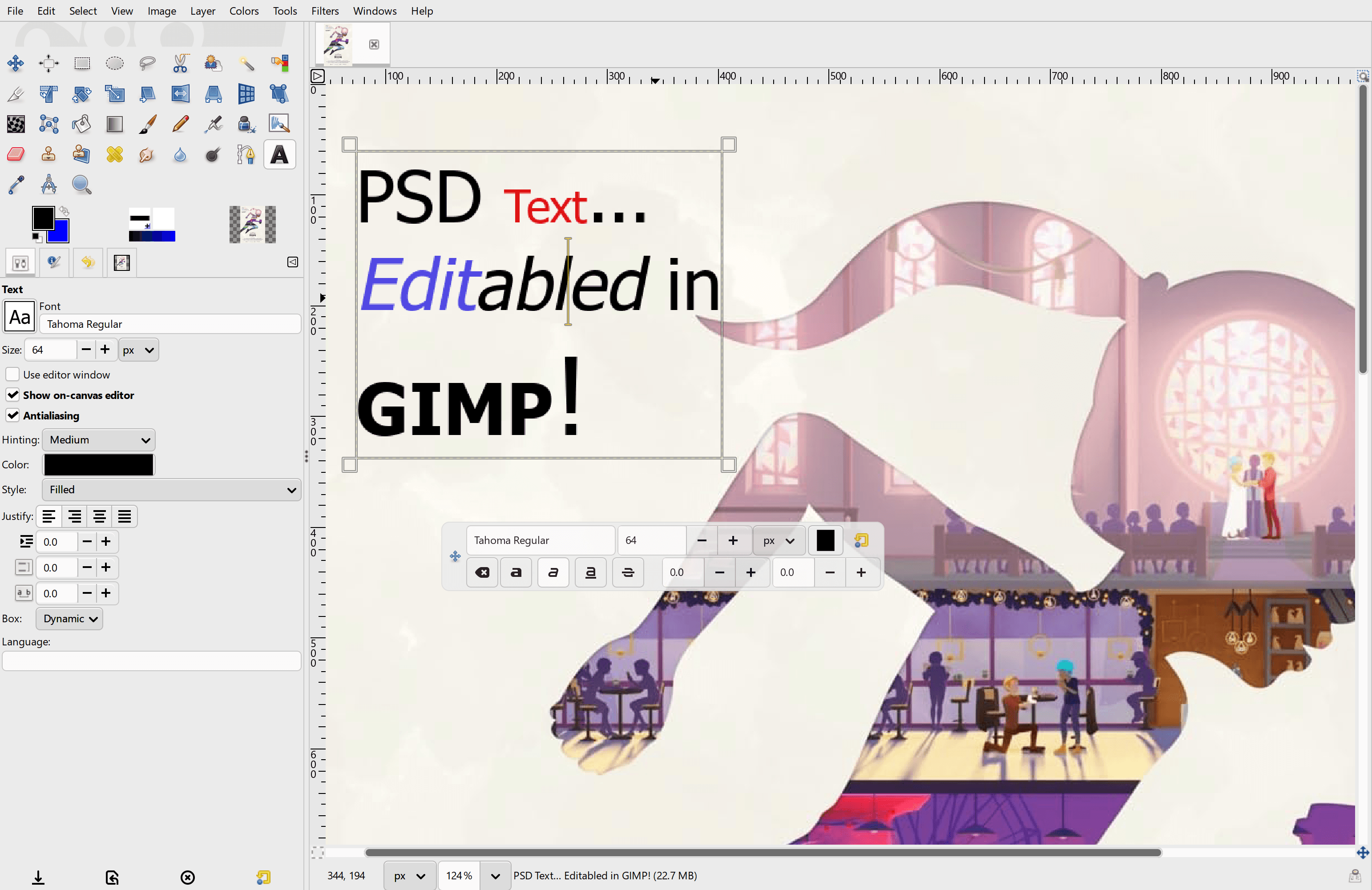
The official update highlights three practical threads: non-destructive filters can now be applied to layer masks, the Gradient Tool can be used non-destructively, and PSD import is getting serious attention through Descriptor support. GIMP says the PSD work already means editable text layers, adjustment layers and modern layer styles can come across as GIMP-native equivalents, while solid color shapes can import as vector layers.
My take: this is relevant because free creative tools do not win only by being free. They win when they stop punishing people for collaborating with paid-tool users.
PSD compatibility is the emotional feature
For designers, photographers, illustrators and small studios, the file format is often the workflow. A person may prefer open-source tools, but clients, agencies and collaborators still send PSDs. If opening that file means flattened text, broken effects or lost structure, the free tool becomes a weekend experiment rather than a daily option.
GIMP’s August update is not a magic claim that every Photoshop file will behave perfectly. It is more grounded than that. The team says modern PSDs rely on Descriptor data beyond the older public Adobe specification, and that reading those Descriptors is now improving imports in ways users can actually notice.
| Update area | Why it matters |
|---|---|
| Editable PSD text layers | Makes received design files less likely to become dead images. |
| Adjustment and layer-style import | Preserves more of the author’s intent when moving between tools. |
| Solid color shapes as vector layers | Keeps simple design elements editable instead of frozen. |
| PSD metadata export path for TIFF/JPEG | Helps information survive when files leave GIMP again. |
| Non-destructive mask filters | Lets editors tune effects without burning changes into the base layer. |
That is a very different kind of progress from adding a novelty filter. It is infrastructure for people who need their tool to survive contact with other people’s files.
GIMP 3.2 set the table
The March 2026 GIMP 3.2 release already moved the editor in this direction. GIMP’s official release notes list Link Layers for external files, Vector Layers from paths, an Overwrite paint mode, text-editor improvements and broader format support including PSD-related layer-style improvements. CG Channel’s coverage framed the release around link and vector layers, better Photoshop interoperability and workflow gains.
The August update feels like the less flashy second act: less “look at this new capability” and more “make the capability tolerable across platforms and messy files.”
That includes native file chooser work. It sounds boring until you remember how much creative work is just opening, placing, exporting and finding assets across macOS, Windows, Linux, network folders and cloud-sync directories. A file picker that behaves like the rest of your operating system is not a luxury. It reduces tiny points of irritation all day.
The caveat is still important
GIMP’s own earlier 3.1.2 post warned that development releases are not for production use and may crash. That mindset should carry into how readers interpret the August development update. Some features are emerging work, not a finished promise that a freelancer should bet a client deadline on tomorrow morning.
There is also the Photoshop reality. Adobe’s format is broad, old, commercial and full of edge cases. Better PSD import is hugely valuable, but it will not instantly erase the difference between native Photoshop workflows and open-source alternatives.
The practical advice is simple: test with duplicate project files first. If a PSD round-trip matters for paid work, check text layers, masks, adjustment behavior, blend modes, linked assets, print colors and exports before committing.
Who should care
| Reader | Why this update matters |
|---|---|
| Freelancers | More editable PSD imports can reduce subscription pressure for occasional client files. |
| Students | Free tools become easier to recommend when they handle common formats better. |
| Linux creators | Native file dialogs and performance fixes make the app feel less like a compromise. |
| Small teams | Open-source workflows get more plausible when interchange improves. |
| Photoshop loyalists | This is not a reason to switch overnight, but it is a reason to keep watching. |
Personally, I like this direction because it respects the unromantic side of creative work. People do not only need brushes, layers and filters. They need to open the file that arrived in Slack, make the edit, export the right thing and move on.
Bottom line
GIMP’s August update is compelling because it aims at friction, not fantasy. Better PSD handling, non-destructive editing and native-feeling file dialogs are exactly the sort of improvements that make free software easier to trust for real work.
It is still a development path, not a finished victory lap. But if GIMP keeps attacking the everyday reasons people fall back to paid tools, the open-source editor becomes harder to dismiss with every release.
Support independent GearPulse articles at buymeacoffee.com/gearpulse.site.