
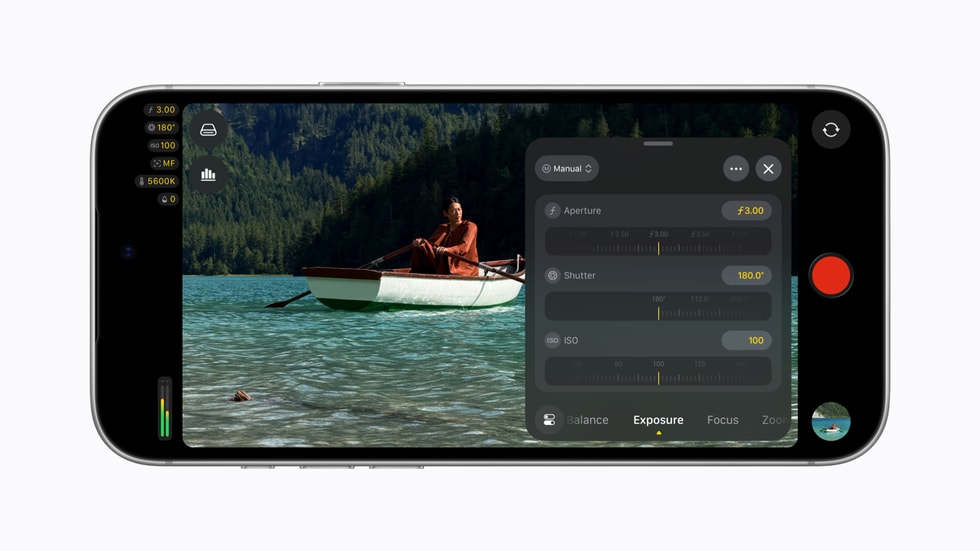
The iPhone 18 Pro has already made the hardware case for variable aperture. Final Cut Camera 2.4 makes the more interesting promise: that a phone can be operated as a deliberate camera on a real set, not merely used as an emergency angle.
Apple’s free update, released September 29, brings direct aperture control to the iPhone 18 Pro’s Fusion Main camera, adds aperture- and shutter-priority recording modes, and rearranges the controls that matter while shooting. It also expands the monitoring and output features that separate a useful phone B-camera from a polished social-video device: RGB Parade and histogram scopes, clean SDI output through an HDMI-to-SDI converter, and genlock offset.
That is a different story from the iPhone 18 Pro launch. The phone supplied a physical camera control. This update supplies the operating language to use it under pressure.
The feature is control, not blur
Apple says the iPhone 18 Pro’s main camera has four physical aperture settings, from ƒ/1.48 to ƒ/4.0. Final Cut Camera can select them precisely or allow the operator to set aperture priority or shutter priority. PCMag Middle East’s launch coverage correctly places that alongside the app’s existing manual vocabulary: shutter angle, Kelvin white balance and focal length in millimeters rather than consumer-camera shorthand.
That may sound like a fussy UI change. It is actually how a small camera becomes predictable. An operator can protect motion rendering with shutter priority, or choose how much of a subject and background should remain sharp with aperture priority. The phone still has a small sensor, computational processing and the practical limits that come with both. But the creative decision moves earlier—before the shot is committed.
| New control | What it helps an operator decide | What it does not solve |
|---|---|---|
| Direct variable aperture | Light intake and the physical component of depth of field | The small-sensor look or a poorly lit scene |
| Aperture priority | Keep a chosen aperture while exposure changes | A rapidly changing scene that needs manual intervention |
| Shutter priority | Preserve intended motion blur as light changes | Flicker caused by mismatched lighting or display refresh |
| False color, clipping indicators and focus peaking | Judge exposure and focus before recording | A calibrated external reference monitor |
| RGB Parade and histogram | Check channel balance and exposure distribution | Automatic color accuracy or a finished grade |
The distinction matters for creators working with a mirrorless or cinema camera. A B-camera does not become valuable because it can make a pretty image in isolation. It becomes valuable when its exposure and framing decisions can be made quickly, explained to a crew, and repeated across takes.
Apple is aiming at the spaces between cameras
The update’s strongest additions are not necessarily the aperture controls. They are the tools that let an iPhone live beside other cameras.
Clean SDI output lets the phone send a clean signal through an HDMI-to-SDI converter for a broadcast or switcher workflow. Genlock offset is designed to compensate for display artifacts or timing differences when the iPhone is used with other genlocked cameras. Those are niche features, but they are valuable precisely because they are niche: Apple is acknowledging that professional video is often a system, not one device held at arm’s length.
The useful caveat is that support is not the same as a turnkey rig. An HDMI-to-SDI converter, cabling, power, mount, compatible monitor or switcher, and a production that understands sync still cost time and money. GearPulse would not present this as a replacement for a dedicated broadcast camera. It is a more credible route for a compact angle, a crash camera, a tight-space insert, a remote head or an additional multicam perspective.
The Apple Post independently reports the same clean-SDI and genlock additions, while PCMag frames the update against Final Cut Camera’s existing ProRes and timecode-oriented workflow. Together, those reports support the important conclusion without turning a spec sheet into a promise: the phone is becoming easier to integrate, not magically identical to every camera around it.
The post-production change may matter more
Apple has also enabled Cinematic-mode effects for regular video, including ProRes and Apple Log footage, with focus points and depth of field adjustable later in Final Cut Pro. This is the most tempting part of the announcement—and the easiest to misuse.
The upside is obvious. A shooter can preserve a cleaner capture decision on set, then refine attention and apparent depth in the edit. For a one-person production, that can rescue a shot where the performance was right but focus placement was not. For an editor, it creates another lever after the card has been handed over.
The risk is assuming that every decision should be deferred. Depth choices affect how a scene feels, and a rushed post adjustment cannot turn an indifferent composition into an intentional one. Treat the new flexibility as insurance and a finishing tool, not permission to stop judging the frame while filming.
Who should care
| Workflow | Why this update is useful | Sensible expectation |
|---|---|---|
| Solo creator | Faster access to exposure, focus and framing tools | A more controlled phone shoot, not a cinema package |
| Final Cut Pro editor | More latitude for Cinematic-style focus adjustments after capture | Extra editorial options, with a need for restraint |
| Small multicam team | Cleaner monitoring and potential SDI/genlock integration | A phone can take a specialized angle if the rig is tested first |
| Casual iPhone shooter | A free app with a clearer professional interface | The stock Camera app may remain the faster choice for spontaneous clips |
This is also a welcome counterpoint to the current tendency to judge phone video by one dramatic before-and-after clip. The more useful test is whether a device lets a creator make fewer accidental decisions. The redesigned Final Cut Camera puts shutter angle, ISO and white balance closer to the surface; customizable overlays, a recording tally light and a two-finger control clear-out all address the same problem: seeing the shot and its state without digging through a phone interface.
Bottom line
Final Cut Camera 2.4 does not make the iPhone 18 Pro a universal replacement for a dedicated camera. It makes it more persuasive as a camera with a job on a production.
The hardware’s variable aperture now has a workflow around it. The scopes, clean SDI output and genlock offset make Apple’s professional-video ambitions tangible, while the editable Cinematic effects offer a useful safety net after the shoot. The real win is not a more cinematic-looking phone clip. It is a phone camera that gives a thoughtful operator more ways to be intentional before, during and after the take.
For creators who already use iPhone as a second angle, install the free update and test it beside the rest of the kit before a paid shoot. That is where this release earns its place: not as a headline feature, but as a quieter improvement in how reliably the phone can do assigned work.
Support the site at buymeacoffee.com/gearpulse.site.