
Apple Creator Studio’s latest update is not trying to win the AI demo contest. That is what makes it interesting.
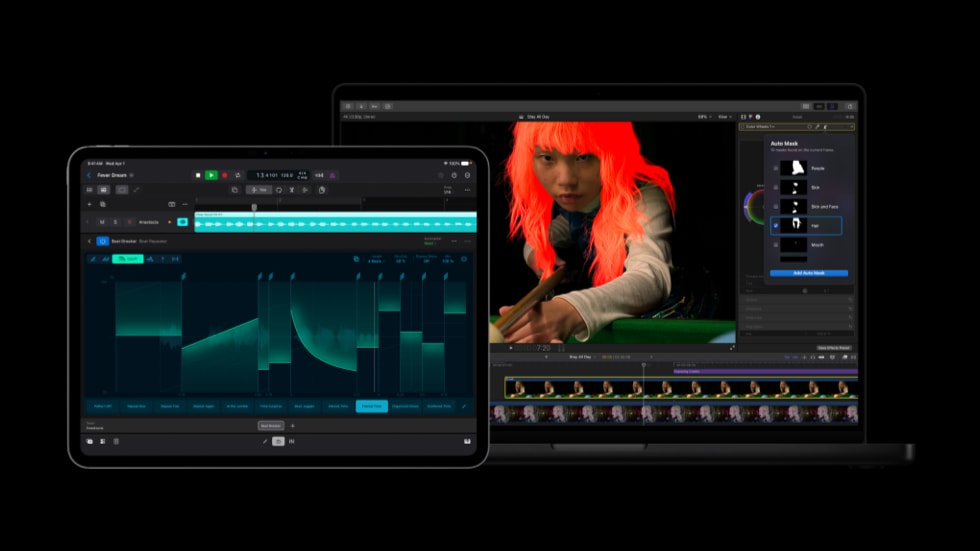
Apple’s June 30 update adds more intelligence across Final Cut Pro, Pixelmator Pro, Keynote, Pages, Numbers, and Logic Pro. The headline features are practical: Generate Captions, Edit Detection, Auto Mask, improved color matching, Pixelmator handoff, generated shapes, and a Logic Pro Producer Project.
None of that sounds as flashy as a general-purpose AI assistant. For creators, it may be more useful.
What Apple added
Apple launched Creator Studio in January as a subscription bundle around Final Cut Pro, Logic Pro, Pixelmator Pro, Motion, Compressor, MainStage, and premium creative features in Apple’s productivity apps. The new update is about making those apps feel less isolated.
| Area | New or expanded feature | Why it matters |
|---|---|---|
| Final Cut Pro | Generate Captions | Turns spoken audio into captions without leaving the edit |
| Final Cut Pro | Edit Detection | Helps split or identify edits in existing footage |
| Final Cut Pro | Auto Mask and improved Match Color | Makes isolation and color work faster for common subjects |
| Final Cut Pro + Pixelmator Pro | Send frames and assets between apps | Reduces the export-import friction between video and image work |
| Keynote, Pages, Numbers | Pixelmator integration and generated shapes | Brings image creation closer to presentation and document work |
| Logic Pro | Producer Project | Gives musicians a structured starting point instead of a blank session |
Apple Support documentation confirms Generate Captions as a Final Cut Pro workflow, with requirements and language limits. That is a useful caveat: these are not magic features that work equally on every device, language, or project.
The real product is workflow
The obvious way to describe this update is “Apple adds AI features.” The better reading is that Apple is turning AI into creative plumbing.
Editors do not usually want to stop an edit, open another app, generate an asset, export it, rename it, import it, and then repeat the process when the client changes their mind. Musicians do not always want an empty timeline. Presenters do not want to spend half an hour reshaping slide objects by hand if the idea is already clear.
The best AI features in creative tools are not the ones that replace judgment. They remove the boring steps between judgment calls.
That is why Generate Captions and Auto Mask matter. Captions still need review. Masks still need taste. Color still needs an eye. But if the software gets the first pass close enough, the creator spends more time deciding and less time tracing.
Why the subscription angle matters
Creator Studio is also a business decision. Apple lists the suite at $12.99 per month or $129 per year in the U.S., with education pricing and a one-month free trial. Apple still offers one-time purchase versions of major Mac apps such as Final Cut Pro and Logic Pro, but the most connected bundle story is now the subscription.
That creates a familiar tradeoff.
| Reader question | Practical answer |
|---|---|
| Is this useful for working creators? | Yes, if the new features save repeated production time |
| Is it a replacement for Adobe Creative Cloud? | Not for everyone; the app mix and collaboration model are different |
| Is it only for professionals? | No, but casual users may not need the full bundle |
| Does it avoid cloud-AI concerns? | Some features are on-device, but Apple notes that some AI features may use third-party models or have usage limits |
The caveat is important. Apple’s privacy positioning is stronger when intelligence runs on the user’s device. But Creator Studio is a broad bundle, and Apple itself notes that some artificial-intelligence features can involve third-party models, limits, and restrictions. Creative teams should check which features run locally before putting sensitive footage, client material, or unreleased campaign assets into a workflow.
The Adobe pressure point
Apple does not need Creator Studio to beat Adobe everywhere. It needs the bundle to be good enough for a specific group: creators who live in Apple’s ecosystem, want native performance, and do not need the full Adobe stack.
That group is bigger than it used to be. Pixelmator gives Apple a credible image-editing base. Final Cut Pro remains fast and deeply tied to Apple silicon. Logic Pro is already a serious music tool. The missing piece has been connection between apps, not just raw capability inside each app.
This update pushes exactly there. It makes Final Cut, Pixelmator, and the productivity apps feel more like one surface. If Apple keeps tightening those links, Creator Studio becomes less of a bundle and more of a workflow subscription.
What to watch before subscribing
Anyone considering Creator Studio should look past the feature list and ask how often the friction shows up in their own work.
If captions, masks, presentation assets, image cleanup, and music starters are weekly pain points, the subscription may earn its keep. If the work is occasional, one-time purchases or free built-in apps may still make more sense.
The other watch item is lock-in. The more Apple makes creative work flow through its own apps, the more valuable the suite becomes. It also means teams should check export paths, collaboration needs, plug-in support, and how easily projects move to clients or collaborators outside the Apple stack.
Bottom line
The latest Apple Creator Studio update is not about replacing creators with AI. It is about moving AI into the dull middle of production: captions, masks, trims, shapes, handoffs, and first-pass structure.
That is a smarter bet than a flashy demo. Creative work is full of small delays. If Apple can remove enough of them while keeping the creator in control, Creator Studio becomes more than a bundle discount. It becomes a reason to keep the whole workflow on Apple hardware.